Respond to Google Reviews With AI: A Human-Reviewed Workflow
Use AI for a useful first draft, verify the facts, protect private details, and publish a reply in your business voice.


How do you respond to Google reviews with AI?
Start with the public review and only the business context needed to understand it. Ask an AI assistant to identify the main point, separate verified facts from assumptions, and draft two short replies in your normal voice. The assistant is a writing aid, not an approval system.
Before you paste anything, remove surnames, order numbers, phone numbers, health details, and private case notes. Add one real fact the customer mentioned and one next step the business can actually deliver. This gives the model useful context without asking it to invent a story.
The practical rule
Let AI draft the structure and tone. Let a human verify facts, privacy, promises, and the final click on Reply.
What to check before you reply
Read the entire review twice. The star rating is a useful signal, but the written details tell you what the customer actually wants other readers to understand. A three-star review may contain a compliment plus one fixable problem; a one-star review may combine a service failure with a misunderstanding about a policy.
Check the facts you can verify without guessing. Look at the service date, staff notes, order or appointment record, and any existing support conversation. If you cannot verify the situation, do not invent an explanation in public. A calm request for private details is more credible than a confident answer built on assumptions.
- Identify the specific experience the reviewer mentioned.
- Separate facts you can verify from claims you still need to investigate.
- Decide whether the issue can be resolved publicly or needs private follow-up.
- Remove personal data, order details, health information, and internal notes.
- Use the same calm tone you would use with a customer standing in front of you.
- Proofread the reply once for blame, sarcasm, promises, and accidental admissions.
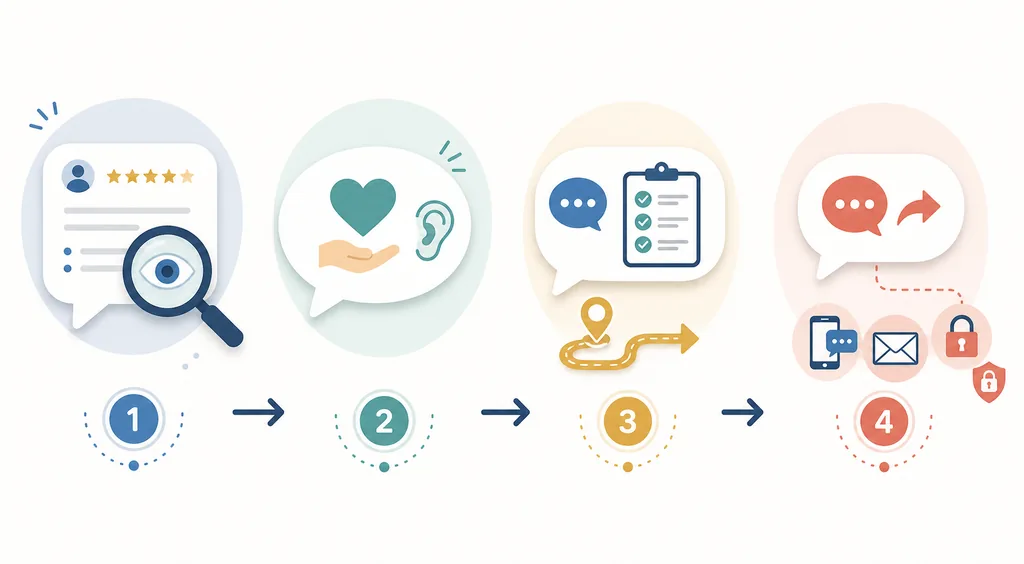
The four-step response framework
The best response is not the longest response. A simple four-step structure helps a business stay specific without turning every review into a formal statement. Use the same structure for positive, mixed, and negative feedback, then change the emphasis to match the situation.
Think of the framework as a guardrail, not a script. If a review is obviously spam, contains private information, or raises a serious safety issue, follow the platform’s reporting and support process instead of trying to solve everything in a public comment.
1. Read and identify
Name the real topic of the review in your draft: a helpful employee, a delayed order, a missing feature, a clean room, or another concrete detail.
2. Acknowledge
Show that you understood the experience. Thank the reviewer for a positive detail, or recognize the frustration before you explain anything.
3. Answer and act
Add the useful next step: a brief clarification, a correction, an invitation to reconnect, or the operational improvement you can honestly promise.
4. Move sensitive details privately
Offer a direct contact route when account research is needed. Never ask the customer to post personal information in the public reply.
Google review response examples
Use the examples below as starting points, not as text to paste into every review. Replace the bracketed idea with a real detail from the customer’s experience. If the wording could apply to any business in any industry, it is probably too generic.
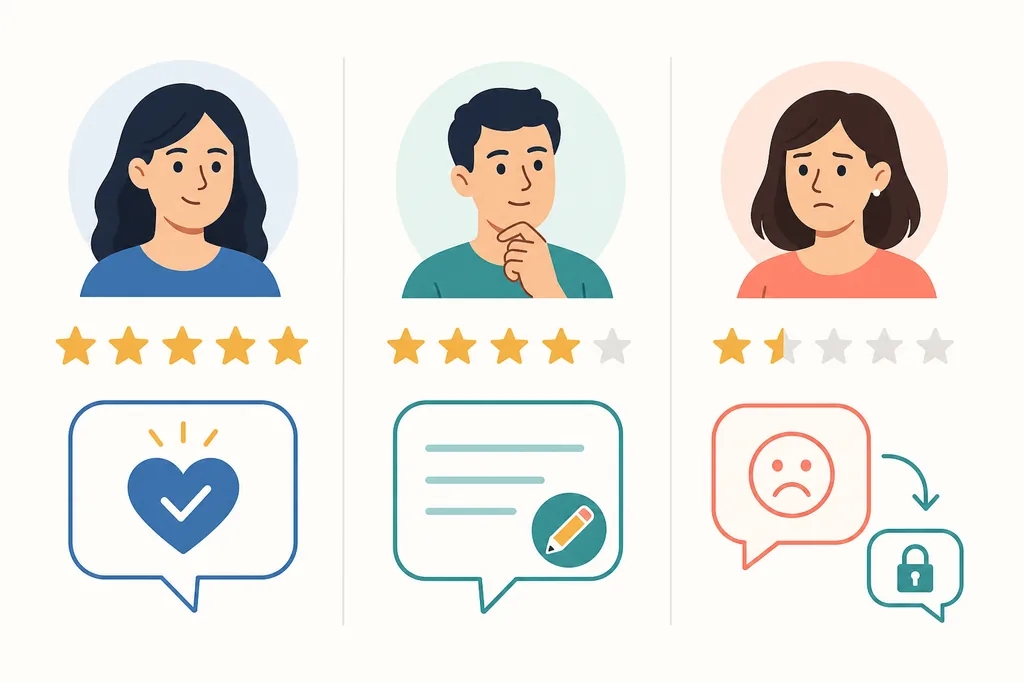
Positive review response examples should reinforce the detail the customer valued. Mixed-review replies should thank the customer while addressing the improvement point. Negative-review responses should reduce heat, avoid public debate, and offer a clear private follow-up path.
| Review type | Reply goal | Example response |
|---|---|---|
| Five-star review | Thank the customer and reinforce a real detail. | Thank you for mentioning the quick installation and the care our team took with your space. We’re glad the result worked well for you, and we appreciate you choosing us. |
| Short positive review | Add warmth without inventing details. | Thank you for the kind review. We’re pleased you had a smooth experience, and we hope to welcome you back whenever you need us. |
| Three-star review | Acknowledge the good and the gap. | Thank you for sharing both what worked and what felt slow. We’re glad the final result met your needs, and we’re reviewing the wait-time issue with the team. |
| Negative service review | Recognize frustration and move to resolution. | We’re sorry the visit did not meet the standard you expected. We would like to review what happened and make this right; please contact [channel] with your visit details so we can investigate privately. |
| Policy misunderstanding | Clarify without embarrassing the reviewer. | Thank you for raising this. Our current policy is [short accurate explanation], but we understand how the wording could be confusing. We’re updating the information so the next step is clearer. |
| Possible spam or wrong business | Avoid a public argument. | We want to look into this carefully, but we cannot match the details to a customer record. Please contact [channel] so our team can verify the situation and help if this review is about our business. |
How to respond to a negative Google review
A negative review is not a request to win an argument. Future customers are watching whether the business stays respectful when something goes wrong. The strongest public reply is often shorter than the original complaint because its job is to show accountability and open a path to resolution, not to publish every side of the dispute.
Avoid accusing the reviewer of lying, listing every internal effort, or asking them to delete the review before the issue is resolved. Do not offer a refund, discount, or legal conclusion in public unless the offer and wording have been approved for the situation. Keep the response focused on what you can verify and what the customer can do next.
If the complaint involves health, safety, harassment, threats, or personal data, limit the public reply to a neutral acknowledgement and move the matter to the appropriate private or official process. Document the case internally and use platform reporting tools when the content violates policy.
- Lower the temperature. Wait until you can write without sarcasm or defensiveness. A fast reply is useful only when it is accurate and respectful.
- Name the concern. Use one sentence that shows you understood the problem, without repeating sensitive details or admitting facts you have not checked.
- Offer a practical route. Give one private contact option and explain what information the team needs to investigate. Avoid sending the customer through a maze of generic links.
- Close the loop. If the issue is resolved, thank the customer for the opportunity to review it. Do not pressure them to change or remove their honest review.
Use AI for drafting, not blind auto-replies
A saved reply brief makes Google review response AI more consistent. Write down the business voice, preferred length, phrases to avoid, facts that may be offered publicly, and the private contact route for account-specific questions. Paste that brief with each redacted review.
Ask for two versions under a clear limit, such as 40 to 60 words. Require one specific detail from the review, no invented outcome, no sales offer, and no personal information. For a one- or two-star review, ask the assistant to lower the temperature and invite private follow-up instead of arguing.
Keep a human approval step even when a review platform offers automation. Google reviews replies against its content policies, and the reply appears publicly under the review. A person must decide whether the draft is accurate, fair, and appropriate for the situation before it is posted.
- Redact private details before sending a review to a general AI service.
- Give the assistant verified facts and tell it to mark unknowns instead of guessing.
- Add one genuine detail from the customer’s words so the reply is not boilerplate.
- Escalate health, safety, legal, harassment, and suspected-fake-review cases to the right human process.
- Review the exact text in the Business Profile before selecting Reply.
Frequently asked questions
Can AI write a response to a Google review?
Yes. AI can turn a redacted review and verified notes into a short draft. A person should check facts, privacy, tone, promises, and policy fit before publishing.
What prompt should I use for a Google review response?
Give the assistant your voice, the review text, the verified context, the desired length, and rules such as no invented facts, no private details, and one specific detail from the review. Ask for two editable drafts.
Is it safe to paste a full Google review into AI?
Only when the text contains no unnecessary personal or sensitive information and the service is approved for the workflow. Redact names, identifiers, contact details, and private case history first.
Should AI automatically post every review reply?
Keep a human approval step, especially for negative, unusual, sensitive, or policy-related reviews. Automation can prepare drafts, but it cannot verify what happened or decide what the business is authorized to promise.
How long should an AI-assisted Google review reply be?
Two to five clear sentences are usually enough for a public first reply. A short acknowledgement and private contact route is safer than a long explanation of account details.
Can I use the same AI reply for every Google review?
Use a repeatable structure, but personalize each reply with a real detail and the right tone. Repeating the same wording can look inattentive and may miss the customer’s actual concern.
Final checklist before you post
The best way to respond to Google reviews with AI is to keep the roles clear. AI reduces the blank-page problem and can offer a calm structure. The business still verifies what happened, removes private information, acknowledges the customer’s experience, and decides what it can honestly do next.
Use the workflow for consistency, then make one human edit for every review. For complicated or sensitive cases, keep the public reply brief and move the investigation to the approved private or official process.